
The last part of this lesson is based on teachcomputing.org lessons.

Today, you are going to….
- revise how the internet works
- explore key components of websites
- test your knowledge on websites
1.

Let’s revise how the internet works!

How the Internet Works in 4 Minutes | Animation Video. (4:03 minutes long)
(Advanced information…)
2.
What is a website?
A website is a collection of related web pages hosted on a server and accessible through the internet.
3.
What makes a website?
Websites can be made up of lots of different web pages. The pages are related and together they make a website.
4.
What are the key components that make up a website?
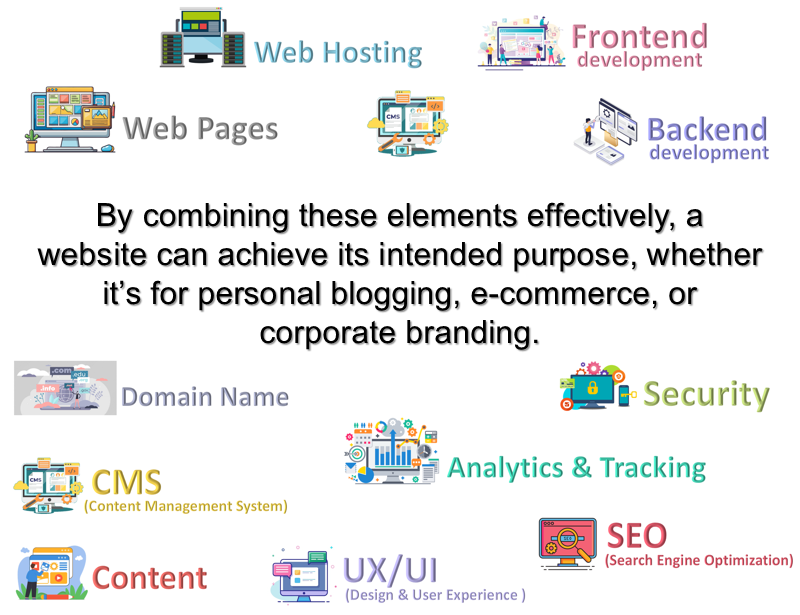
Here are the key components that make up a website:
Domain Name & Web Hosting, Content & Web Pages, Frontend & Backend, Content, Management System (CMS), Design and User Experience (UX/UI), SEO (Search Engine Optimization), Analytics and Tracking, Security
By combining these elements effectively, a website can achieve its intended purpose, whether it’s for personal blogging, e-commerce, or corporate branding.
5.
How are websites created?

Key Technologies used in making a website are:
- HTML structures the content.
- CSS styles the content (colors, fonts, layout).
- JavaScript adds interactivity (sliders, menus, animations).
We will now look at each of the key components that make up a website.
6.
This is the website’s address, such as http://www.google.com.
(It makes it easy for users to find the website instead of typing a long server IP address.)
7.

This is a service that stores your website’s files and makes them accessible on the internet.
There are different types of web hosting:
1) Shared Hosting: Multiple websites share a single server.
2) Dedicated Hosting: One server is dedicated to a single website.
3) Cloud Hosting: Resources hosted across multiple servers.
8.

This is the information and media presented on the website.
Content includes:
- Text (articles, product descriptions, blog posts)
- Images (photos, illustrations)
- Videos and audio files
- Interactive elements (forms, maps, quizzes)
9.

These are the individual documents or pages within a website.
Examples include:
1) Homepage: The main page users see first.
2) About Page: Details about the organization or individual.
3) Contact Page: Contains contact forms or contact details.
Webpages are typically coded in HTML, styled with CSS, and made interactive with JavaScript.
10.

This is the visible part of the website that users interact with.
Key Technologies used in the “frontend” are:
1) HTML: Structures content.
2) CSS: Styles the content (colors, fonts, layout). (CSS is the acronym of “Cascading Style Sheets”. CSS is a computer language for laying out and structuring web pages.)
3) JavaScript: Adds interactivity (sliders, menus, animations).
11.

This is the server-side infrastructure that powers the website.
Key technologies used in the “backend” are:
1) Programming Languages: PHP, Python, Ruby, Java, etc.
2) Databases: Store and manage content (e.g., MySQL, MongoDB).
3) Server: Manages requests and delivers web pages.
12.
This is a platform for managing website content without needing to code.(CMS allows non-technical users to easily update the website.)
Examples: WordPress, Drupal, Joomla, Shopify, Google Sites.

You will use a CMS make your own website! (You will use Google Sites, which is a very basic CMS.)
13.

This refers to the layout, navigation, and usability of the website.
UX / UI includes:
1) Responsiveness (adapts to mobile and desktop screens).
2) Accessibility (usable for people with disabilities).
3) Visual appeal (modern and professional design).
14.
These are techniques to improve a website’s visibility in search engines.
SEO includes:
1) Optimizing content with keywords.
2) Fast loading speeds.
3) Mobile-friendliness.
4) Quality backlinks.
15.

These are measures to protect the website and users.
(Website security prevents hacking, data breaches, and malware.)
Examples:
1) SSL Certificate (encrypts data transfer).
2) Firewalls.
3) Secure coding practices.
16.

These are tools to monitor user behavior and website performance.
(Analytics & Tracking help improve content, design, and marketing strategies.)
Examples: Google Analytics, Heatmaps, Conversion Tracking.
17.
18.
Do you know the key components of a website?
19.
More on Media…
It is very important that the content on a website is used responsibly.

What is copyright?
Copyright is the “property right” of authors (and creators) to control, protect, and use their artistic works as they wish.
It is easy to copy, change, or download content from the internet. Copyright law protects the control you have over the things that you create. It also protects the work of others.
If you want to use someone else’s work you should:
- Ask permission
- Give credit to the person who made it
- Buy it — if it has a cost attached (e.g. from an online resource library)

How to use images Responsibly and Respectfully
Sometimes it is possible to copy part of someone’s work.
For example, if you are using part of someone’s content e.g. a picture for your school work. This is acceptable.
School children are not expected to pay for images they find online BUT…
You just have to remember:
- You can only use part of the work
- You can’t make money from it
- It needs to look completely different in your piece of work than in the original piece
- Credit the owner
20.
Which of these cases require copyright?

(WordPress advertisements may appear below.)
 Best study methods