

Today, you are going to….
- practise coding with Scratch
- create a project with a bouncy ball

1.
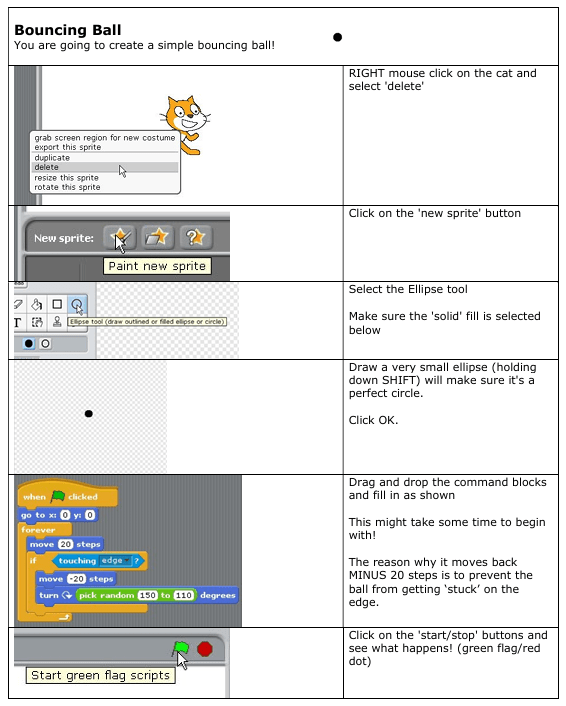
You are going to create a simple bouncing ball!
Read through the instructions provided. The use it to create codes in Scratch for your “Bouncy Ball Project”.
2.
Access SCRATCH here.
3.
RIGHT-mouse click on the cat and select ‘delete’.

4.
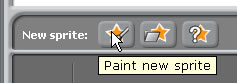
Click on the ‘new sprite’ button.
5.
Select the Ellipse tool. Make sure the ‘solid’ fill is selected below.

6.
Draw a very small ellipse.
(Holding down SHIFT, will make sure it’s a perfect circle.)
Click OK.

7.
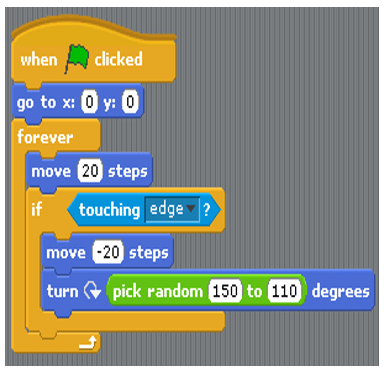
Drag and drop the command blocks and fill in as shown.
This might take some time to begin with!
(The reason why it moves back MINUS 20 steps is to prevent the ball from getting ‘stuck’ on the edge.)
8.
Click on the ‘start/stop’ buttons (green flag/red dot) and see what happens!


(WordPress advertisements may appear below.)
 Best study methods